
1. What is RTMP?
RTMP (Real Time Messaging Protocol) is a protocol for transmitting audio, video, and interactive data in real time over an internet connection. It is designed to maintain a persistent connection and deliver content with low latency between the broadcasting device (encoder) and the media server.
RTMP was originally developed by Macromedia specifically for the Flash Player, and Adobe took over the protocol after acquiring Macromedia in 2005. Adobe publicly released the basic technical specification in 2012, paving the way for numerous open source and commercial systems to integrate RTMP into their streaming infrastructure.
Although Flash Player was officially discontinued at the end of 2020, RTMP continues to thrive on the ingest side, the stage where the encoder sends the raw video stream to the media server before it is repackaged into formats suitable for end user devices. This is why RTMP still appears in most professional broadcasting software, such as OBS Studio and Wirecast, as well as in hardware encoder systems.

2. Components of RTMP
To understand how RTMP works, it helps to know the four components that make up the protocol.
2.1 Chunk stream
RTMP breaks audio and video data into smaller units called chunks before sending them over the network. The default chunk size is 128 bytes for video and 64 bytes for audio. This mechanism allows multiple data streams to be transmitted simultaneously over a single TCP connection without blocking one another, while also reducing latency when delivering real time content.
2.2 Message
RTMP uses the concept of a message to classify the data it transmits. There are three main message types: audio messages (sound data), video messages (image data), and data messages (metadata such as codec information, timing, and stream parameters). Each message carries its own header containing type, timestamp, and size information, which lets the receiver reconstruct the stream in the correct order and format.
2.3 Handshake
Before any actual data transfer begins, the client and server perform a three step handshake to authenticate the connection and synchronize timing. This process is fast, typically completing in under a few hundred milliseconds, but it plays a critical role in ensuring the integrity and synchronization of the data stream that follows.
2.4 Protocol variants
RTMP has several variants developed for specific needs:
- RTMPS: An SSL/TLS encrypted version that runs over port 443. This variant is preferred whenever the stream needs to be secured, particularly for copyrighted content or broadcasts over public networks.
- RTMPE: Uses Adobe's proprietary encryption mechanism and is less common than RTMPS in modern deployments.
- RTMPT: Tunnels RTMP inside HTTP, allowing it to bypass firewalls or proxies that block port 1935.
- RTMFP: A UDP based version that supports peer to peer connections with lower latency, commonly used in real time conversational applications.
3. How does the RTMP protocol work?
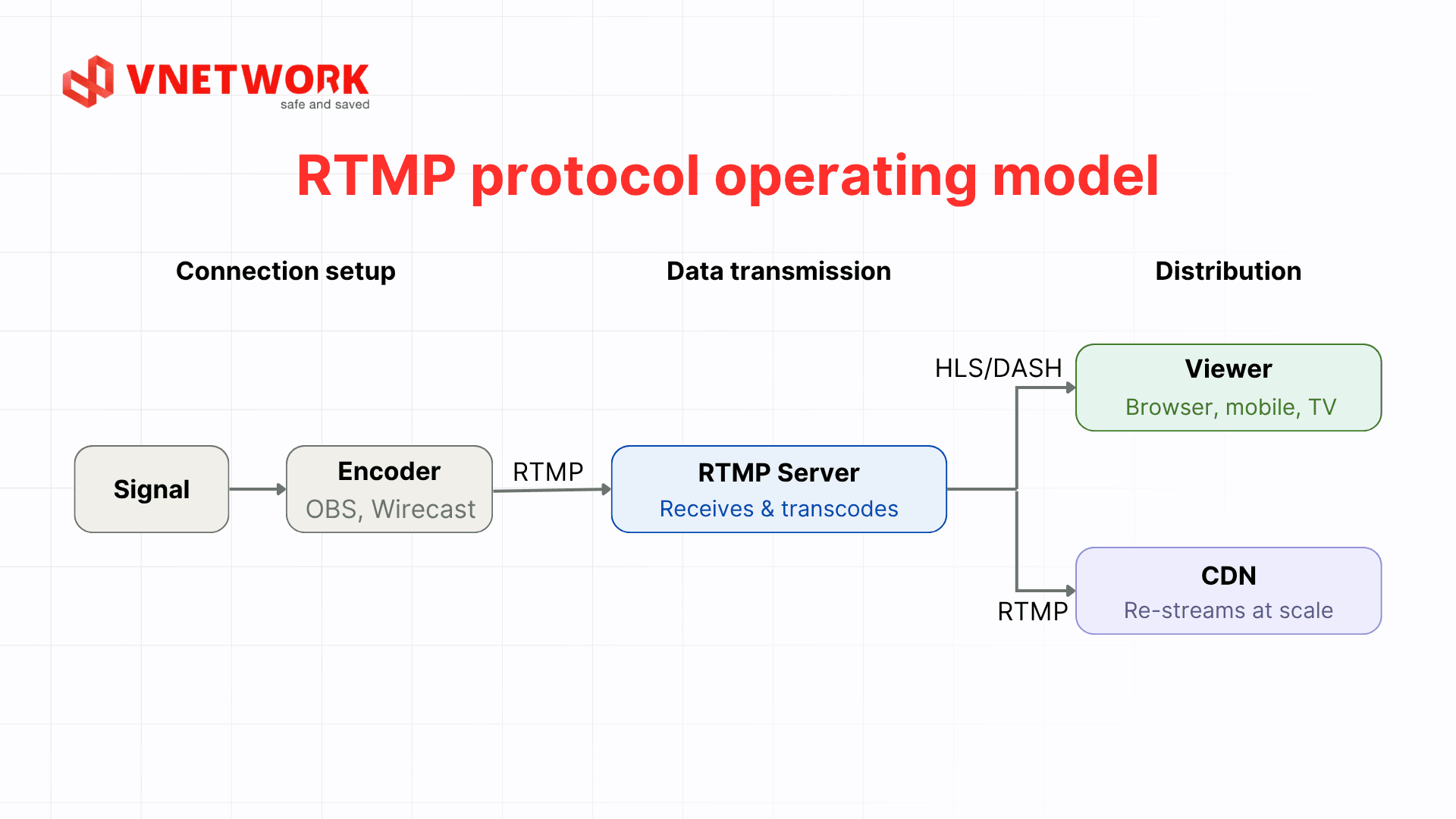
RTMP operates on a client server model, maintaining a continuous TCP connection throughout the streaming session. The process consists of three main stages.
3.1 Stage 1: Establishing the connection
The encoder (broadcasting software or hardware) initiates a TCP connection to the media server over port 1935 (the default). Once the TCP handshake completes, the three step RTMP handshake is performed to synchronize timestamps and confirm the session. The client then sends a connect() command to request access to a specific application on the server.
3.2 Stage 2: Transmitting data
Once the connection is established, the encoder continuously pushes audio and video chunks to the server. The data is broken into small chunks that are interleaved over the same TCP connection to reduce latency. The media server receives the raw data from the encoder and performs transcoding, converting it into formats suitable for end user devices, such as HLS or DASH.
3.3 Stage 3: Delivering content to viewers
After transcoding, the video stream is delivered to viewers through CDN infrastructure. At this stage, RTMP usually steps back from the primary role and gives way to HLS or DASH, since these protocols are better suited to modern browsers and mobile devices. Even so, the RTMP connection between the encoder and the media server remains the first and most critical link in the entire broadcast pipeline.
Comparison table: RTMP versus common streaming protocols
| Protocol | Latency | Primary role | Supported platforms | Most common with |
| RTMP | 1–3 seconds | Ingest (encoder → server) | Broadcasting software | OBS, Wirecast, hardware encoders |
| HLS | 5–30 seconds | Delivery (server → viewer) | All browsers and devices | OTT, VOD, large scale livestreaming |
| WebRTC | < 500ms | Real time conversation | Modern browsers | Video calls, online conferencing |
| DASH | 4–20 seconds | Adaptive bitrate delivery | Android, web | Global video platforms |
4. Advantages of RTMP
RTMP holds an irreplaceable position in the streaming ecosystem thanks to several distinct technical advantages.
4.1 Low latency at the ingest stage
RTMP maintains a continuous TCP connection rather than opening a new connection for every data segment the way HLS does. This keeps latency between the encoder and the media server to just 1 to 3 seconds, which suits events that demand an instant response, such as live sports matches or audience interactive programs.
4.2 Broad compatibility with broadcasting software
Most professional encoder software and hardware support RTMP as a default output protocol. This lets broadcast studios, television networks, and content producers integrate RTMP into their production workflows without having to replace existing equipment.
4.3 Carrying multiple streams simultaneously
RTMP's chunk stream mechanism allows multiple audio, video, and metadata streams to be transmitted simultaneously over a single TCP connection. This reduces network connection overhead, which is especially useful when broadcasting multi camera or multi language content.
4.4 Easy integration with CDN infrastructure
RTMP works well as the ingest point for dedicated CDN systems. After receiving the RTMP stream from the encoder, the CDN can transcode and deliver the content in multiple formats, ensuring viewers on different devices all get optimal broadcast quality. Load balancing at the CDN layer also helps distribute traffic when viewer numbers spike during major events.
5. Limitations of RTMP
Alongside its strengths, RTMP also has certain limitations that businesses need to consider when building streaming infrastructure.
5.1 Incompatible with modern browsers
After Flash Player was discontinued at the end of 2020, browsers no longer support direct RTMP video playback. This means RTMP cannot deliver content straight to the end viewer; an additional conversion step to HLS or DASH is required for playback on the web and mobile devices. The delay introduced by this conversion step is a risk point that needs careful failover planning.
5.2 Dependence on the TCP connection
RTMP relies on TCP to ensure reliability, but this is also a weakness when the network connection is unstable. TCP’s error control mechanism can increase latency when packets are lost, making RTMP less effective on mobile networks or low quality wireless connections.
5.3 Port 1935 can be blocked
Many corporate, school, or restricted network environments block RTMP’s default port 1935. Although the RTMPT variant over HTTP can work around this restriction, configuring an additional tunneling layer adds deployment complexity and can affect performance.
5.4 No built-in adaptive bitrate
Unlike HLS or DASH, RTMP has no built in adaptive bitrate (ABR) mechanism. The encoder must decide the broadcast bitrate up front, and if network conditions fluctuate, RTMP stream quality can suffer without any automatic adjustment. This is why modern streaming systems typically use RTMP only at the ingest stage and switch to HLS/DASH for delivery to viewers.
6. Why should businesses pair RTMP with a CDN?
RTMP handles the ingest problem well, the stage of moving the video stream from the encoder to the media server. However, to get that content to thousands or even millions of viewers at once with stable quality across many device types, a business needs a sufficiently strong content delivery layer behind it, typically through the HLS protocol running on top of a CDN. When RTMP operates on its own without this delivery layer, all viewer traffic funnels into a single media server, which can easily lead to overload, buffering, or broadcast interruptions when viewer numbers spike.
- Unlimited scalability: A CDN distributes HLS content across a network of distributed servers, allowing it to serve thousands to millions of viewers simultaneously without upgrading the origin media server. This is a decisive factor for large scale live broadcast events.
- Lower latency to the end viewer: A CDN delivers content from the PoP closest to the viewer’s geographic location rather than connecting back to a single central point. This reduces buffering time and improves broadcast quality even over low bandwidth connections.
- Guaranteed uptime during major events: CDN infrastructure includes failover and automatic load balancing mechanisms that keep broadcasts running even if one point in the network fails. Downtime during a live broadcast event is an unacceptable risk for media and OTT businesses.
- Optimized bandwidth costs: A CDN’s intelligent caching mechanism reduces the number of requests that hit the origin server directly, saving substantial bandwidth when viewer traffic surges, instead of having to invest in more origin infrastructure capacity.
- Securing the broadcast stream: A dedicated CDN integrates security features such as DDoS protection, token access, and access control, helping protect the RTMP stream from hijacking or denial of service attacks.
With many different streaming CDN providers on the market, businesses should carefully compare PoP coverage, caching technology, and pricing before choosing one. For a broader overview before deciding, see this comparison of leading streaming CDN providers.
7. HLS Low Latency from VNETWORK: the ideal delivery companion for RTMP
HLS traditional implementations typically carry 12 to 30 seconds of latency because content is split into segments and the client must wait to request each one. To address this limitation, VNETWORK developed HLS Low Latency, part of the VNCDN ecosystem, which follows the LL-HLS (Low-Latency HLS) standard and brings broadcast latency down to just 3 to 5 seconds, delivering a near real time experience for viewers.
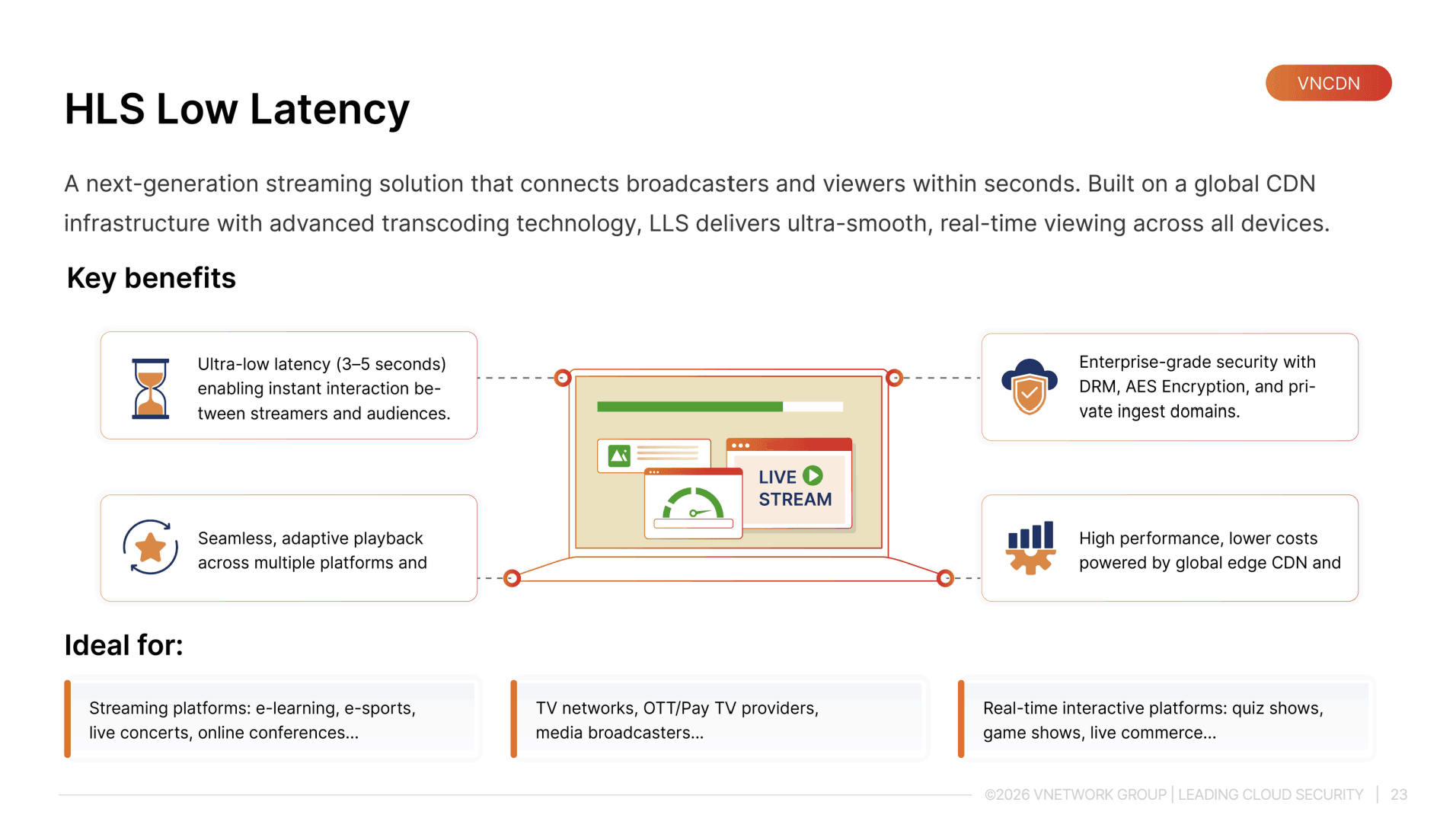
- Ultra low latency: Following the LL-HLS standard, latency drops to 3 to 5 seconds, well suited to interactive livestreams such as e-commerce, major events, or live television.
- Strong global infrastructure: A network of more than 2,300 PoPs across 146 countries, using NVMe/SSD servers and automatic routing to the point closest to the viewer to minimize transmission latency. Businesses planning large scale expansion can also look into the Multi-CDN versus Single-CDN model to optimize coverage and stability.
- GOP cache technology: Reduces latency from the very first frame, keeping the broadcast smooth and continuous from the moment a viewer starts watching.
- Extended capabilities: Supports recording, time shift playback, and content protection, suiting a wide range of business models from online education to large scale event broadcasting.
For OTT platforms, television networks, and online event organizers already using RTMP for ingest, converting to HLS at the delivery stage is a mandatory step to get content to viewers on every device. Businesses can also check out this list of top low latency streaming solutions to compare options and choose the one that fits their scale and budget.
Conclusion
RTMP is a streaming protocol that has gone through more than two decades of development and still plays a key role in the ingest stage of every professional livestream system. Low latency, strong compatibility with broadcasting software, and flexible integration with CDN infrastructure are the reasons RTMP has yet to be fully replaced, even though Flash is long gone. To get the most out of RTMP, media and OTT businesses need to invest in a sufficiently strong CDN infrastructure behind it.
FAQ - Frequently asked questions about RTMP
1. Is RTMP still used in 2025?
Yes. Even though Flash Player has been discontinued, RTMP remains the standard ingest protocol for most professional livestream systems. Most major broadcasting platforms accept RTMP as the input, then convert it to HLS or DASH for delivery to viewers.
2. What is the most important difference between RTMP and HLS?
RTMP and HLS serve two different roles in the streaming pipeline. RTMP carries the video stream from the encoder to the server with low latency (ingest), while HLS delivers content from the server to viewers on browsers and mobile devices. The two protocols are usually used together rather than as substitutes for one another.
3. Is RTMP secure?
Standard RTMP does not encrypt data. To secure the stream, you should use the RTMPS variant (SSL/TLS encryption over port 443). Attaching a stream key and implementing authentication at the media server layer also helps prevent unauthorized users from hijacking the broadcast.
4. How can you reduce latency when using RTMP?
To optimize RTMP latency, pay attention to three factors: the quality of the connection between the encoder and the media server (a stable fiber connection is preferred), a short keyframe interval setting (typically 2 seconds), and the geographic location of the media server relative to the encoder. When pairing with a CDN, choose the ingest point closest to the broadcast location to minimize network latency.
5. Is RTMP suitable for small businesses or content creators?
Absolutely. RTMP does not require expensive dedicated hardware. Free broadcasting software supports RTMP output, and many streaming CDN platforms allow RTMP connections with flexible pricing based on actual traffic. What matters most is choosing the right media server and CDN to ensure stable bandwidth as viewer numbers grow.