
1. What is SMTP?
SMTP (Simple Mail Transfer Protocol) is the standard protocol used to transfer email between mail servers over the Internet. It operates on a client-server model at the application layer, has been in development since the 1980s, and remains an indispensable foundation in every modern email system. Unlike email retrieval protocols such as IMAP or POP3, SMTP has one responsibility only: transporting email from sender to recipient.
The key distinction to understand is that SMTP does not read, store, or display email. The protocol operates entirely at the transport layer, meaning that once an email reaches the destination server, SMTP's job ends and other protocols take over from there.
Because of this specialized role, SMTP has become a core component in every email infrastructure, from personal mailboxes to large-scale enterprise communication systems.

2. How does SMTP work?
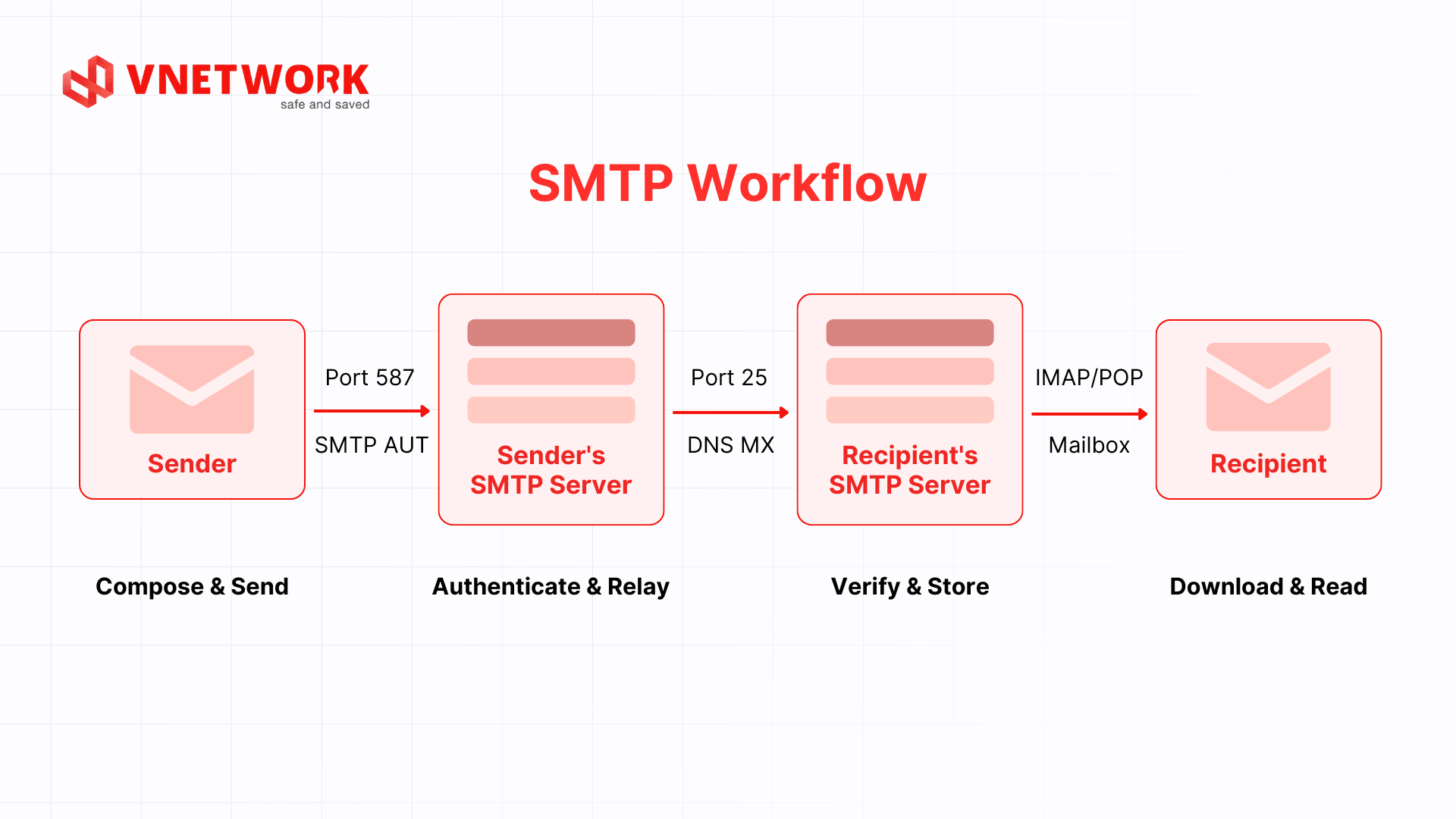
SMTP operates through a clearly defined sequence of steps, from the moment a user clicks Send to the moment an email appears in the recipient's inbox. Understanding this flow enables technical teams to diagnose issues faster and configure systems more accurately.
- Connection: The email client initiates a connection to the organization's SMTP server on the configured port (587 or 465). The connection is encrypted with TLS to protect data from the very start of the session.
- Authentication: The client submits credentials via the SMTP AUTH mechanism. The SMTP server verifies the sender's identity before allowing the transaction to proceed.
- Transaction declaration: The client sends the MAIL FROM command to declare the sender address, followed by the RCPT TO command to specify one or more recipient addresses.
- Content transfer: The client issues the DATA command along with the complete email content, including the header and body. The SMTP server confirms successful receipt with a 250 response code.
- DNS MX lookup: The SMTP server queries the MX record of the recipient's domain to determine the address of the destination SMTP server to forward the message to next.
- Relay or queue: The email is forwarded directly to the recipient's SMTP server if the connection is available. If the destination server is temporarily unresponsive, the email is held in a queue and retried at intervals, before a non-delivery report is returned to the sender if the retry limit is exceeded.
- Final delivery: The destination SMTP server accepts the email and stores it in the recipient's mailbox. From there, the user can retrieve or read the email through POP3 or IMAP depending on their email client configuration.
3. SMTP server and its role in the email system
An SMTP server is a machine running software that implements the SMTP protocol. It acts as an intermediary that receives email from clients, validates it, and forwards it to the destination server or the next relay server. Every organization that uses email needs at least one SMTP server to operate its communication infrastructure.
An SMTP server performs three core functions: authenticating senders to prevent spoofing, routing email to the correct receiving server based on the MX record in DNS, and recording transaction logs to support monitoring and troubleshooting. When an email cannot be delivered, the SMTP server holds it in a queue and retries after a set interval, or returns a non-delivery notification to the sender if the retry limit is reached.
In enterprise environments, SMTP servers are commonly integrated with security and content filtering layers to control bidirectional email flow, blocking spam email and email-borne threats before they reach end users.
4. The difference between outbound and inbound SMTP servers
A complete email system typically includes two types of SMTP servers with distinct functions: outbound (sending) and inbound (receiving). Separating these two flows allows organizations to control email quality and apply appropriate security policies to each direction.
The outbound SMTP server handles all email leaving the organization, from messages sent to partners and automated transaction notifications to marketing campaigns. Every email originating from inside the network must pass through the outbound SMTP server before leaving the organization's infrastructure. The primary risk on this side is account compromise, where a hijacked account is used to send spam or phishing messages, causing the organization's IP address to be blocklisted and disrupting all outbound email activity. Outbound SMTP servers therefore require strict sender authentication, including SMTP AUTH and properly configured SPF, DKIM, and DMARC records.
The inbound SMTP server handles email coming into the organization from outside. This is the entry point most commonly targeted by attackers attempting to deliver phishing messages, malware, or domain spoofing attacks. The inbound SMTP server does not handle end-user email retrieval; that is the responsibility of POP3 and IMAP. Its role is to receive email from the Internet, verify sender legitimacy, and deliver the message to the internal mailbox after passing through security filters.
The core distinction between the two directions lies in traffic flow and the corresponding threat landscape. Outbound SMTP faces risks from inside the organization (compromised internal accounts, data exfiltration via email), while inbound SMTP must contend with external threats (malicious email, malware-laden attachments, links leading to spoofed pages). Organizations should implement separate security policies for each direction rather than applying the same ruleset to both, since each direction has its own risk profile and countermeasures. The table below summarizes the key differences:
| Criteria | SMTP Outbound | SMTP Inbound |
| Function | Handles email sent out of the organization | Receives email coming in from outside |
| Traffic direction | Internal to Internet | Internet to Internal |
| Primary risks | Account compromise, spam sending, data leakage | Phishing, malware, domain spoofing |
| Security measures | SMTP AUTH, SPF, DKIM, DMARC | Spam filtering, sandbox, header verification |
| End-user retrieval protocol | Not applicable | POP3 or IMAP |
POP3 and IMAP are not involved in the transfer of email between servers. These two protocols are only used at the final step, once an email has arrived at the destination server and the user wants to download or read it from their email application. IMAP is better suited to enterprise environments because it synchronizes the mailbox across multiple devices.
5. Common SMTP ports
A port defines the connection channel on which an SMTP server listens. Each port has its own development history and intended purpose. Choosing the wrong port is a common reason why an email client fails to connect to a server or why email gets blocked by a network service provider.
| Port | Name | Encryption | Use case |
| 25 | Original SMTP | None (or STARTTLS) | Relay between SMTP servers; commonly blocked by ISPs for end users |
| 465 | SMTPS (legacy) | SSL/TLS required | Client email submission; common on older systems |
| 587 | Submission | STARTTLS (recommended) | Modern standard for client email submission, defined by RFC 6409 |
| 2525 | Alternative | Varies by configuration | Fallback when the above ports are blocked; not an official standard |
Port 587 is the recommended choice for most client and application email submission scenarios today. Port 25 is still used for relay between SMTP servers, but most ISPs block this port for regular users to prevent spam from being distributed directly.
6. The importance of SMTP servers for businesses
Email is not simply a communication tool; it is the operational infrastructure behind many business processes: order confirmations, electronic invoices, service notifications, customer support, and internal communication. When an SMTP server encounters issues or is misconfigured, all of these processes are disrupted, with a direct impact on the organization's credibility.

6.1. Ensuring email reaches recipients on time and to the right place
An SMTP server is the component that determines whether an email is actually delivered. When a message is sent, the SMTP server is responsible for looking up the destination server, establishing a connection, and forwarding the content according to the protocol. If the server is misconfigured or has a poor reputation, email will be rejected at the receiving end without a clear notification being sent back to the sender. For operational workflows that depend on email, such as order confirmations, transaction alerts, and system notifications, delays or delivery failures have a direct impact on the customer experience and business performance.
6.2. Protecting the domain and IP reputation of the business
Each time an email is sent, the receiving server evaluates the reputation of the sending IP address and domain based on activity history and compliance with authentication standards. A good reputation ensures email consistently reaches the primary inbox; a poor reputation causes all organizational email to be treated as spam, including fully legitimate messages. The approach to building and maintaining a sustainable reputation is described in detail in the section on configuring SPF, DKIM, and DMARC authentication below.
6.3. Controlling email flow and preventing data leakage
The SMTP server is the central control point for all email leaving the organization. At the policy level, the SMTP server allows the technical team to define who is permitted to send email, to which addresses, and what types of content are allowed to flow through. This is a separate layer of control from real-time behavioral monitoring, which requires a dedicated email security system described in a later section. When SMTP policies are properly enforced, internal documents, contracts, and customer data cannot be forwarded outside the organization without authorization, reducing the risk of data leakage that could have serious legal consequences.
6.4. Supporting compliance with security and legal regulations
Many industries and markets require organizations to be able to store, trace, and audit all email transactions over a defined period. An SMTP server provides detailed logs of every send and receive transaction, including timestamps, sender addresses, recipient addresses, delivery outcomes, and response codes from the destination server. This data forms the basis for demonstrating compliance, resolving disputes, and investigating security incidents. An SMTP server lacking comprehensive logging leaves the organization with no visibility when it needs to verify which emails were sent, by whom, and when.
7. Common issues when SMTP servers are not properly configured
The following are the most frequent incidents that businesses encounter when their SMTP servers lack proper security and authentication configuration:
- Outbound email lands in the spam folder due to missing SPF records or invalid DKIM signatures.
- Internal email accounts are compromised by attackers and used to distribute phishing email to customers.
- The SMTP server's IP address is added to a blocklist due to a history of spam, causing all email routed through that server to be rejected.
- The domain is subject to spoofing, where attackers forge the organization's sending address to deceive partners and customers.
8. How to optimize and secure an SMTP system for business?
Optimizing and securing an SMTP system is not a one-time configuration task; it is an ongoing process that encompasses authentication setup, email flow control, activity monitoring, and the application of security policies appropriate to the scale of the organization.
8.1. Setting up email authentication with SPF, DKIM, and DMARC
These three email authentication mechanisms work in concert to protect the organization's domain from spoofing and improve the likelihood that email reaches the primary inbox:
- SPF (Sender Policy Framework): Defines the list of IP addresses or mail servers authorized to send email on behalf of the domain. Receiving servers will reject or flag email originating from IPs not included in the SPF record.
- DKIM (DomainKeys Identified Mail): Attaches an encrypted digital signature to each email. Receiving servers verify this signature to confirm that the content was not altered in transit.
- DMARC (Domain-based Message Authentication): Defines the policy for handling email that fails SPF or DKIM checks, including rejection, quarantine to spam, or delivery. DMARC also provides periodic reports that allow the organization to monitor all sources sending email on behalf of its domain.
8.2. Choosing between a self-hosted SMTP server and an email gateway
A self-hosted SMTP server is suitable for organizations with dedicated technical teams and a requirement for full infrastructure control. For most businesses, however, operating their own SMTP server means taking responsibility for security configuration, blocklist updates, IP reputation management, and incident response for email-based attacks.
An email gateway is a solution that sits between the internal SMTP server and the Internet, filtering and controlling all email flow before it enters or leaves the organization. This approach is appropriate when an organization wants a deep protection layer without expanding the technical team, or when the organization must comply with international email security standards.
8.3. Controlling outbound email flow and detecting compromised accounts
Modern email security systems support rate limits that cap the number of outbound emails a given account or user group can send within a defined time window. When an account suddenly sends a volume of email that exceeds its normal threshold, the system automatically alerts the technical team and temporarily blocks sending from that account until it is verified. This capability contains damage from the moment the first anomaly is detected, rather than addressing it only after an incident has already occurred.
8.4. Content filtering and attachment inspection in a sandbox environment
The majority of email-based attacks are delivered through malware-laden attachments or links pointing to spoofed pages. Traditional signature-based content filters are often insufficient to stop new malware variants or more sophisticated phishing techniques.
A sandbox environment allows attachments to be opened and executed in isolation, observing their actual behavior before the email is forwarded to the recipient. If an attachment performs suspicious actions, such as making unauthorized outbound connections or attempting to alter system configuration, the system automatically blocks the email and alerts the security team. Similarly, links inside emails can be inspected in advance, neutralized if they point to malicious pages, and replaced with a warning that users see when they click.
8.5. Real-time email system monitoring and anomaly alerting
An enterprise email system generates a large volume of logs every day. Without an automated monitoring mechanism, anomalous signals such as a sudden spike in bounce rates, an IP address being added to a blocklist, or an account sending email outside business hours will not be detected in time.
Advanced email security systems incorporate real-time monitoring, automatically analyzing logs and issuing alerts when abnormal activity patterns are detected. The technical team receives notifications immediately through prioritized channels, rather than waiting for periodic manual checks. Periodic DMARC reports also allow the organization to track all sources sending email under its domain name, including unauthorized sources, enabling early detection of domain spoofing threats before damage occurs.
9. EG-Platform: enterprise email security solution
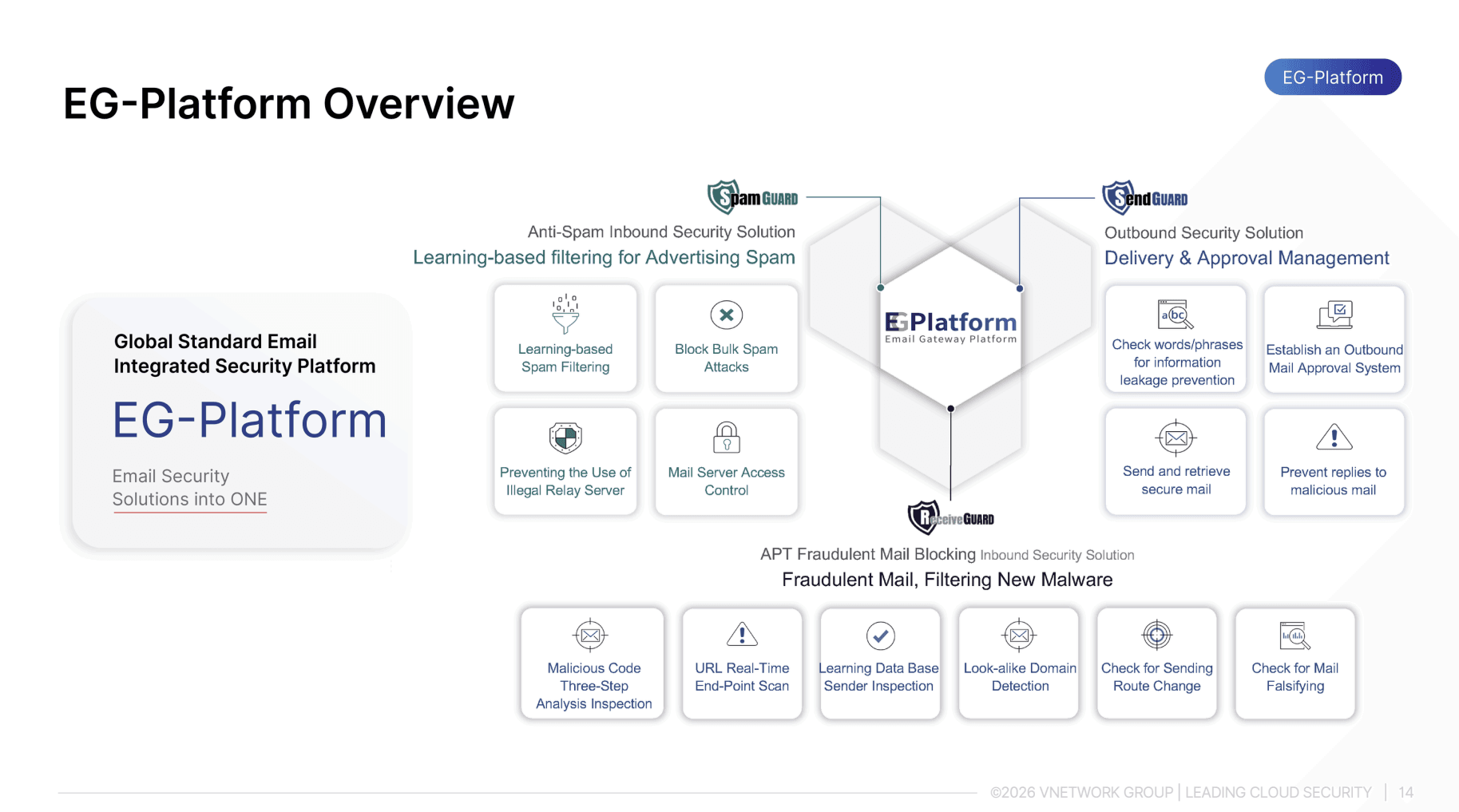
For organizations seeking a layer of email protection that goes beyond what a traditional SMTP server provides, the EG-Platform by VNETWORK is an email gateway platform that applies AI and Machine Learning to deliver comprehensive, bidirectional email security covering both inbound and outbound traffic.
EG-Platform operates on a three-layer protection model working in coordination:
- SpamGUARD: Uses Machine Learning and Bayesian filtering to score the risk level of each email. It verifies SPF, DKIM, and DMARC authentication standards to detect domain spoofing and filter out malware at the point of entry.
- ReceiveGUARD: Protects inbound email by inspecting content, attachments, and URLs inside a sandbox environment. When a suspicious link is detected, the system neutralizes it before the email reaches the user, preventing phishing and social engineering attacks.
- Send Guard: Controls outbound email, preventing compromised internal accounts from distributing phishing content or leaking sensitive data outside the organization.
EG-Platform is an email security platform that meets the ITU-T X.1236 standard set by the International Telecommunication Union, suitable for organizations with high demands for information security and regulatory compliance. The solution integrates directly with existing SMTP infrastructure without requiring a full email system replacement.
10. Conclusion
SMTP is the technical foundation that determines whether every business email reaches the right destination at the right time. Correctly configuring SPF, DKIM, and DMARC, selecting the right connection port, and maintaining continuous monitoring are steps that cannot be skipped in order to keep the email system running stably, protect domain reputation, and sustain customer trust.
FAQ: Frequently asked questions about SMTP
1. How is SMTP different from POP3 and IMAP?
SMTP handles only the sending side of email, transferring messages from the sender to the destination server. POP3 and IMAP are two email retrieval protocols used when users want to download or read email from a server. IMAP is better suited to business environments because it synchronizes the mailbox across multiple devices, whereas POP3 typically downloads and removes messages from the server.
2. Is SMTP secure?
The original SMTP protocol has no encryption, but modern implementations use STARTTLS or SSL/TLS to protect data in transit. Beyond channel encryption, email security also requires correct SPF, DKIM, and DMARC configuration to prevent domain spoofing, as well as SMTP AUTH to verify sender identity.
3. Why does email sent via SMTP end up in the spam folder?
Common causes include missing SPF records or invalid DKIM signatures, the SMTP server's IP address being on a blocklist, a high rate of messages flagged as spam, or sending to a large number of non-existent addresses. Fully configuring SPF, DKIM, and DMARC and maintaining a good IP reputation are the most effective measures for improving inbox placement rates.
4. Do businesses need to host their own SMTP server?
Not necessarily. Operating an SMTP server in-house requires an experienced technical team to continuously manage security, updates, and incident response. Many organizations opt to use SMTP servers managed by a service provider or to combine them with an email gateway in order to reduce operational overhead while still maintaining control over email policy.
5. How does EG-Platform support SMTP?
EG-Platform operates as an email gateway layer placed in front of the internal SMTP system. All inbound and outbound email passes through EG-Platform for inspection, filtering, and authentication before being forwarded. The solution integrates with existing SMTP infrastructure without requiring a system replacement, and adds phishing detection, malware filtering, and outbound email control capabilities that a standard SMTP server does not provide.