
1. What is spam mail?
Spam mail refers to unsolicited messages sent in bulk to large numbers of recipients without their prior consent. Unlike legitimate marketing emails, spam typically lacks a clear unsubscribe mechanism, originates from spoofed or anonymous addresses, and contains content irrelevant to the recipient. Depending on intent, spam can range from irritating promotional material to a vehicle for serious security threats.
To scale their distribution operations, attackers often leverage botnets consisting of thousands of compromised machines. Rather than sending messages individually, these systems can distribute millions of spam emails within a short timeframe, making it significantly more difficult to trace and block the source.
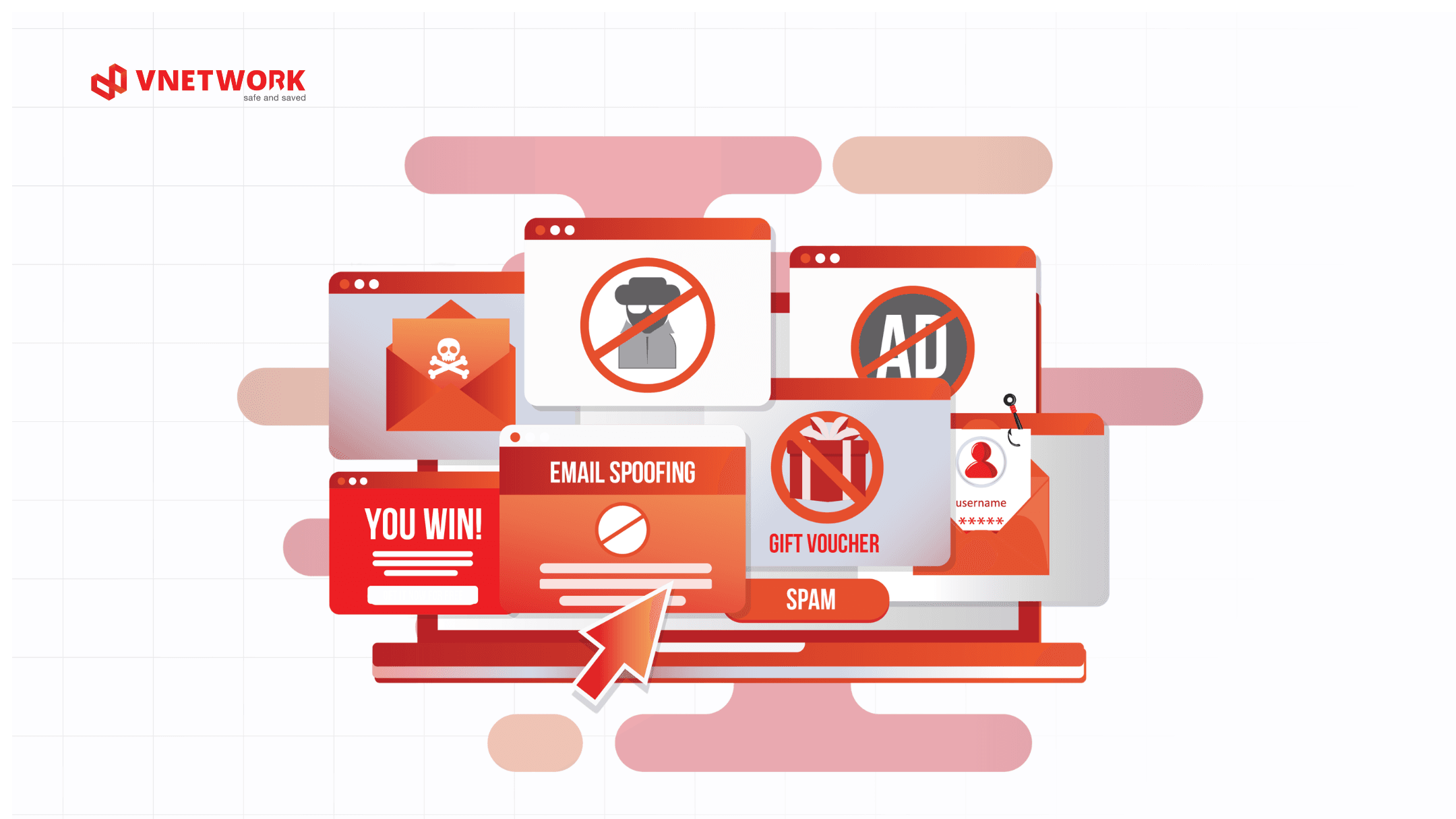
2. Common types of spam mail today
2.1 Commercial advertising spam
This is the most prevalent and generally the least dangerous type of spam. Businesses collect email addresses through online forms and automatically send promotional messages about products or services the recipient never subscribed to. While largely benign, this category still consumes bandwidth, fills up mailboxes, and disrupts workplace focus.
A notable variant is junk mail, which email clients typically sort automatically into a dedicated folder. Users should check this folder periodically to avoid missing important messages that have been misclassified.
2.2 Email spoofing
Email spoofing is the technique of forging a sender's address to make it appear as though the message came from a trusted organization or individual. Attackers may impersonate banks, business partners, or even the recipient's direct manager to request sensitive information or prompt specific actions.
Before responding to or clicking any link in an email, users should carefully verify the actual sender address rather than relying solely on the display name. Learn more about email spoofing to understand how to identify and defend against this type of attack.
2.3 Phishing mail and spear phishing
Phishing mail is a form of spam designed to trick users into disclosing sensitive information such as passwords, banking credentials, or system login data. These emails typically mimic the branding of reputable organizations and create a sense of urgency to pressure recipients into acting without verifying the source.
Even more dangerous is spear phishing, a targeted attack aimed at specific individuals or organizations. Attackers research their targets thoroughly before composing the email, making the content appear highly convincing and far more difficult to distinguish from ordinary phishing mail.
2.4 Fake virus alerts
Attackers send emails warning that the recipient's device has been infected with a virus and urging them to click a link to "scan and remove" it immediately. In reality, these links lead to sites that download malware or harvest personal information.
The correct response is to avoid clicking any link in such emails. If you suspect your device has an issue, use a security tool that is already installed to run a scan rather than following instructions from an unverified email source.
2.5 Spam containing malware and ransomware
This is the most dangerous form of spam for organizations. Emails carry malicious attachments or links to sites distributing malware that activate when the user interacts with them. Once inside the system, malicious code can harvest data, take control of infrastructure, or encrypt all organizational data.
A particularly severe case is ransomware spreading via email. Once triggered, the malware encrypts all data and demands a ransom payment. Recovery after this type of attack is typically time-consuming and resource-intensive, and there is no guarantee that data can be fully restored.
2.6 Lottery scams and financial fraud
Attackers send fraudulent emails claiming the recipient has won a prize in a draw or received a high-value reward. To claim it, the recipient is asked to provide personal information, pay a processing fee, or click a confirmation link.
The simplest rule of thumb: if you did not enter any contest or program, there is no prize waiting for you. Delete the email immediately and do not share any information.
3. The consequences of spam mail for businesses
3.1 Risk of data and internal information exposure
When an employee inadvertently clicks a malicious link in a spam email, attackers can gain access to system credentials, customer data, or internal business documents. Email-driven data breaches are among the most common causes of corporate data leaks today.
The consequences extend beyond data loss to include legal obligations, incident investigation costs, and the risk of regulatory penalties under increasingly stringent data protection frameworks in Vietnam.
3.2 Operational disruption and financial losses
A successful email-based attack can bring down internal systems for hours or even days. Ransomware spread via email is especially dangerous because it can propagate across an entire internal network, forcing organizations to suspend operations while addressing the incident.
Beyond direct damage from data loss and downtime, organizations also bear recovery costs, security consulting fees, and indirect losses from contracts and clients lost during the incident response period.
3.3 Brand reputation damage
If a corporate email system is compromised and used to distribute spam externally, the organization's domain will be added to blocklists maintained by anti-spam services. This causes all outgoing emails, including legitimate correspondence, to be rejected or redirected to recipients' spam folders.
Rebuilding domain reputation and restoring trust among partners and customers after an email security incident is a costly and time-consuming process, particularly for organizations that rely heavily on email as a communication channel.
4. How to identify spam mail (practical checklist)
4.1 Check the sender's email address and domain
The first and most important step is to examine the full sender email address, not just the display name. An attacker may set the display name as "ABC Bank" while the actual address is a string of random characters or a domain resembling the legitimate one. Refer to this guide on identifying fraudulent emails for specific warning signs to watch for.
4.2 Recognize suspicious subject lines and content
Spam emails frequently use subject lines designed to trigger urgency or excessive curiosity, such as "Your account has been compromised," "Claim your reward today," or "Urgent action required." The body often contains spelling errors, unnatural grammar, or unusual requests for personal or financial information.
Organizations should equip employees with a quick-check list for handling unfamiliar emails:
- Does the sender's address match the organization's domain?
- Does the content request passwords, OTP codes, or account details?
- Are there links or attachments from unknown sources?
- Has the sending organization ever been contacted before?
4.3 Handle suspicious links and attachments correctly
Before clicking any link, hover over it to preview the actual URL displayed in the bottom corner of the screen. If the URL does not match the sender's organization or looks unusual, do not click. For attachments, avoid opening formats such as .exe, .bat, .js, .vbs, or compressed files from unverified email sources.
If you suspect a legitimate email has been incorrectly flagged as spam, contact the sender directly through another channel to confirm, rather than replying within the email itself.
5. How to prevent spam mail in organizations
5.1 Deploy SPF, DKIM, and DMARC email authentication
The three email authentication protocols form the security foundation that every organization should implement. SPF (Sender Policy Framework) defines which mail servers are authorized to send email on behalf of the organization's domain. DKIM (DomainKeys Identified Mail) adds a digital signature to emails to verify their integrity during transmission. DMARC combines both and establishes a policy for handling emails that fail authentication.
When all three protocols are activated in tandem, the likelihood of an attacker successfully spoofing the organization's domain to send spam or phishing mail is significantly reduced.
5.2 Security awareness training for employees
People remain the most easily exploited link in the email security chain. Social engineering attacks via email succeed largely because employees have not been equipped with the skills to recognize warning signs.
Organizations should conduct regular email security training, including simulated phishing assessments to evaluate employees' real-world responses. The results help identify which groups need more intensive training.
5.3 Use intelligent email filters and data encryption
The spam filters built into mainstream email clients are often insufficient to handle the sophisticated variants in circulation today. Organizations should supplement these with specialized filtering layers capable of behavioral analysis, detection of emerging attack patterns, and continuous updates against the latest threats.
In parallel, encrypting sensitive emails during transmission and at rest ensures that even if a message is intercepted or leaked, its content remains unreadable to unauthorized parties.
5.4 Update security policies and access controls regularly
Email security policies should be reviewed and updated periodically to reflect evolving threats. Organizations should apply zero trust principles to their email infrastructure: default to treating all emails as unverified until authenticated. Combined with strict access controls and two-factor authentication, this approach significantly reduces the email attack surface.
6. EG-Platform: VNETWORK's comprehensive email security solution
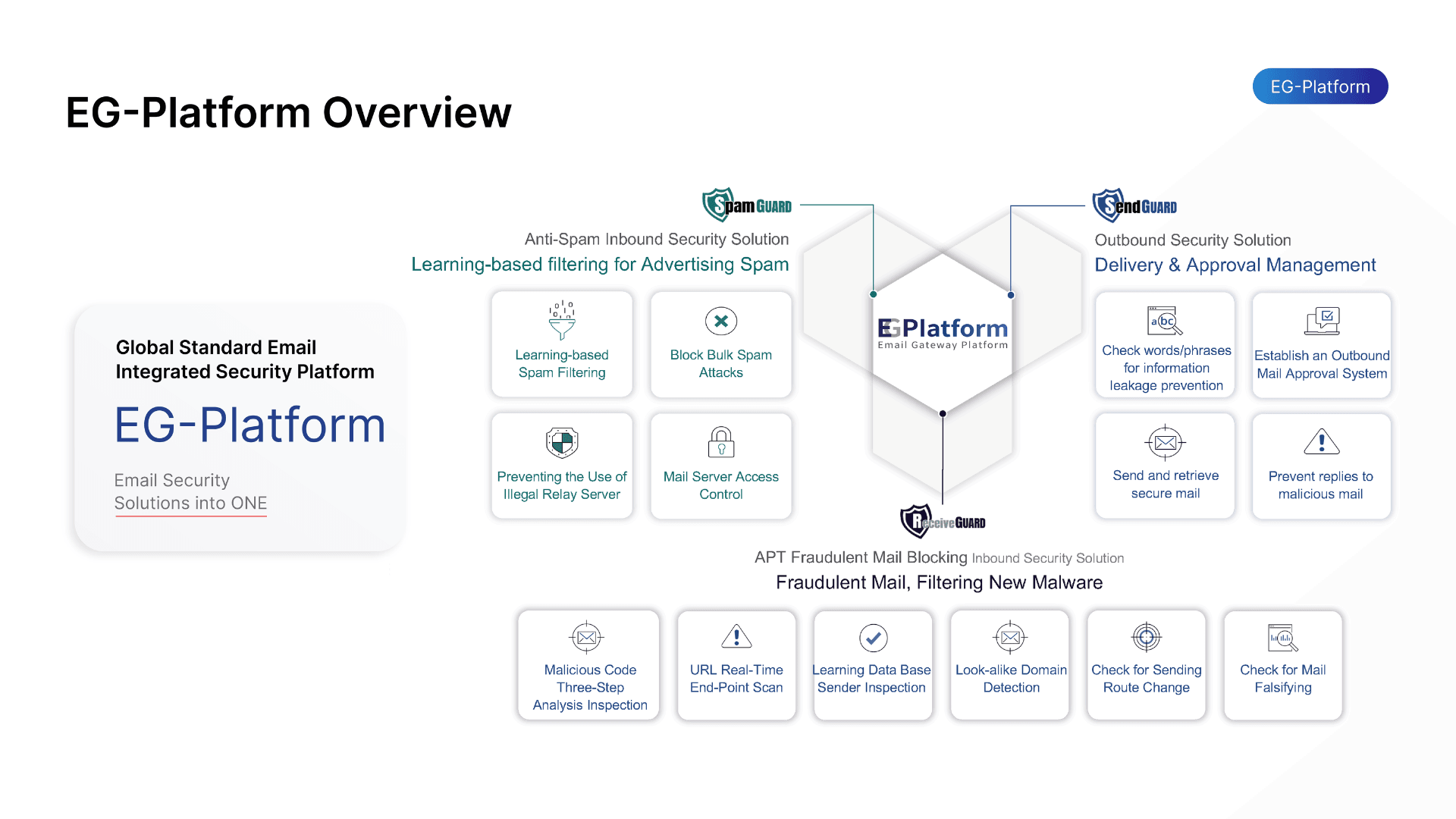
As threats from spam mail grow increasingly sophisticated, organizations need a proactive email security solution rather than one that only reacts after an incident. EG-Platform by VNETWORK is purpose-built for enterprise email security, integrating artificial intelligence and machine learning to detect and neutralize threats in real time.
SpamGuard: Multi-layer spam filtering with machine learning
SpamGuard serves as the first line of defense, processing the entire inbound email stream using machine learning algorithms combined with rulesets sourced from internationally recognized security organizations. The system achieves high-accuracy spam elimination, blocks unauthorized relay servers, and mitigates risks from phishing mail and malicious attachments.
Organizations can customize the filtering workflow according to internal standards, adjust strictness levels for different user groups, and maintain email history logs for recovery when needed.
ReceiveGuard: Inbound email protection
ReceiveGuard addresses more sophisticated inbound threats, including spoofed emails, APT (Advanced Persistent Threat) attacks, and BEC (Business Email Compromise). The system performs real-time URL inspection, converts suspicious links into a safe format, and analyzes user behavior to detect anomalies.
ReceiveGuard also leverages AI to verify email header details, source IP addresses, and character strings showing signs of impersonation, delivering comprehensive protection for users' personal data and internal organizational information.
SendGuard: Outbound email control and protection
SendGuard ensures that every outgoing email is scanned for content before leaving the system. This feature prevents leakage of internal information, detects emails containing malicious code or legally prohibited content, and supports recall of sent messages when errors are discovered.
The system also blocks connections from IP addresses or countries on denial lists, preventing the organization's mail server from being exploited to distribute spam externally.
7. Conclusion
Spam mail is not a new problem, but its threat level continues to escalate as attackers adopt increasingly sophisticated techniques. From promotional nuisances to phishing mail and ransomware spread through attachments, spam serves as the entry point for many serious security incidents.
To protect their email infrastructure, organizations must combine three elements simultaneously: deploying SPF, DKIM, and DMARC authentication protocols; conducting employee security awareness training; and implementing a specialized email filtering solution. EG-Platform by VNETWORK provides all three layers of protection through SpamGuard, ReceiveGuard, and SendGuard, enabling comprehensive email security without requiring changes to existing infrastructure.
Contact VNETWORK via hotline +84 (028) 7306 8789 or email contact@vnetwork.vn for consultation and free POC registration.
FAQ: Frequently asked questions about spam mail
1. What is spam mail and is it really dangerous?
Spam mail (junk email) refers to unsolicited messages sent in bulk to large numbers of users, typically for advertising or fraudulent purposes. Beyond the inconvenience, spam can contain malicious links, malware-laden attachments, or phishing content, making it a serious security threat for both individuals and businesses.
2. How does spam mail differ from phishing mail?
Spam mail is unsolicited email sent in bulk, generally for promotional purposes. Phishing mail is a more dangerous form of spam, carefully crafted to impersonate organizations or known contacts in order to steal login credentials, passwords, or financial data. Phishing mail is an advanced variant of spam with a distinctly deceptive intent.
3. What is the connection between botnets and spam mail?
A botnet is a network of computers that have been infected with malware and are remotely controlled. Attackers use botnets to distribute spam on a massive scale, enabling millions of emails to be sent within a short period without requiring dedicated server infrastructure. This makes spam significantly harder to block and dramatically amplifies the potential damage.
4. How do SPF, DKIM, and DMARC help combat spam mail?
SPF defines which mail servers are authorized to send email on behalf of a domain. DKIM adds a digital signature to verify the integrity of message content. DMARC combines both and specifies how emails that fail authentication should be handled. When deployed together, these three protocols substantially reduce the risk of domain impersonation and improve spam filtering effectiveness.
5. What solution should businesses use to protect email from spam?
Organizations should deploy a dedicated email security solution rather than relying solely on built-in filters. An effective solution needs multi-layer spam filtering, real-time threat detection, SPF, DKIM, and DMARC support, and protection covering both inbound and outbound email. EG-Platform by VNETWORK offers exactly this with three protection layers: SpamGuard, ReceiveGuard, and SendGuard, purpose-built for enterprise email security needs in Vietnam.